
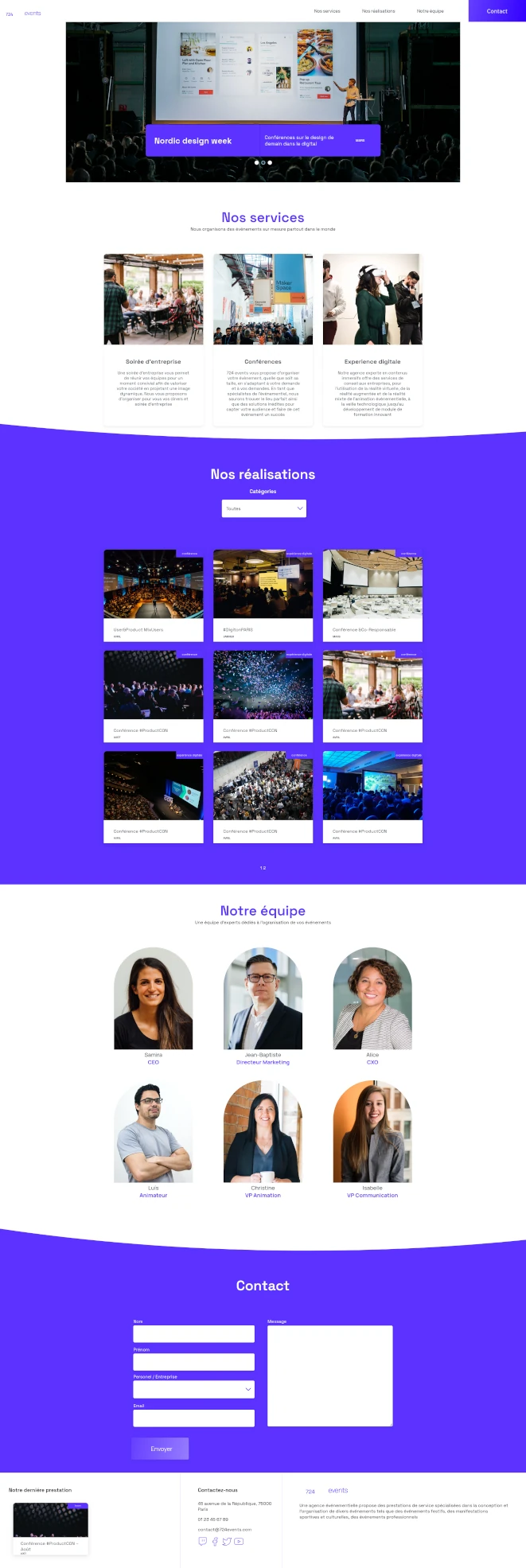
Overview
Five days to launch. The previous developer had stopped answering. The build was green, but the site was broken in ways nobody could fully describe. The agency's commercial activity was waiting on a domain that resolved to a half-working React app. This is the incident report on what we found when we opened the codebase, what we shipped, and why the right answer was almost never the obvious one.
The engagement
Inherit a stalled React one-page site from a vanished contractor and ship it to production within the original deadline. No rewrite, no scope creep, no drama.
The client
724events, an event agency whose inbound pipeline was blocked by a website that wouldn't load cleanly. Time-to-launch was a revenue problem, not a vanity metric.
The diagnosis
Undocumented codebase, cascading silent failures, a test suite that passed without testing the right things, and zero handover from the previous owner.
The outcome
Stable build shipped on schedule. Critical paths covered by tests that actually fail when something breaks. A handover document the client can hand to the next engineer without apologizing.
Rescue work is the least glamorous engagement in this industry, and the one most likely to separate engineers from people who write code. Nobody hires you to be creative on a rescue. They hire you to be calm, fast, and to leave the codebase better than the panic that produced it.
What we found when we opened the hood
The first 90 minutes of any rescue are spent reading, not typing. Here's the forensic snapshot of what we inherited: the kind of detail most case studies edit out, and the kind that tells you whether the team you're hiring has actually done this before.
- A green CI pipeline that meant nothing. The test suite passed. The site was broken. On inspection, tests asserted that components rendered, not that they did anything useful when a user clicked them. Coverage as theater.
- A slider that worked once. The carousel advanced on first interaction, then locked. Root cause: a stale closure over an index variable, classic React Hooks footgun, never caught because no test simulated a second click.
- Anchor links pointing into the void. Half the in-page navigation targeted IDs that had been renamed during a refactor and never updated. The browser scrolled to the top silently. No console error, no visible failure, just a confused user.
- A contact form that swallowed errors. Submission triggered a
fetchwith no.catch, no error state, no user feedback. On failure, the form looked successful. The agency had no idea how many leads they were already losing. - Zero handover. No README beyond the Create React App boilerplate. No commit messages above three words. No architectural notes. Every component had to be reverse-engineered from its imports outward.
This is the part of a rescue that matters most: building a mental model of someone else's codebase before you touch a single line. Skip this step and every "fix" creates two new bugs.
Triage
We sorted everything we found into three buckets, in this order, and stuck to it ruthlessly.
Ship-blockers. Bugs that made the site embarrassing to publish. The slider lock, the silent form failure, the broken anchors. Non-negotiable, fixed first, every fix paired with a regression test.
Quality-of-experience issues. Layout glitches on mobile, sluggish transitions, focus states missing on interactive elements. Fixed in the time remaining after ship-blockers were closed.
Out of scope. Architectural debt, the lack of TypeScript, the test suite philosophy, the missing design system. All real problems. None of them solvable in five days without introducing more risk than they removed. We documented every one of them in the handover and walked away.
The discipline of a rescue is not in what you fix. It's in what you refuse to fix.
Key results
Shipped on the original date
No deadline slip, no scope renegotiation. The site went live on the day the client had already committed to commercially.
Tests that fail when they should
Regression coverage rewritten around real user paths: slider interaction, form submission, navigation. Every fix is now guarded by a test that breaks if the bug returns.
Silent failures eliminated
The contact form now surfaces errors, retries gracefully, and confirms success explicitly. The lead pipeline stopped leaking the day we shipped.
A handover the next owner can read
Structured acceptance document, point-by-point validation, list of known limitations and recommended next steps. No hand-waving, no 'should be fine.'
Tech stack
- React (Hooks, Context)
- Jest + React Testing Library (rebuilt around behavior, not render coverage)
- ESLint, Prettier (enforced via pre-commit)
- Chrome DevTools, React DevTools (forensic debugging)
- Git / GitHub (with commit hygiene reintroduced)
- Vercel (deployment)
What we'd tell the next owner
Rescue engagements end the moment the site is stable. They don't end the technical debt. Here's what we wrote into the handover: the honest version of "what to do next" that most agencies are too proud to put in writing.
- The architecture needs a deliberate rewrite within twelve months. Not because what's there is broken, but because what's there can't absorb the next round of features without compounding the debt we just stabilized.
- Migrate the test suite to Vitest and Playwright. The current Jest setup works but is slower than it should be, and end-to-end coverage on the critical conversion path would catch the next class of bugs before they ship.
- Replace the contact form with a typed schema and server validation. The current implementation is honest about its failures now, but the client-only validation is still a single point of trust.
- Add basic analytics. The site is currently a black box. Knowing which sections prospects actually read would inform every future content decision.
We wrote this knowing we might not be the team that does the work. That's the point of an honest handover.
What this engagement reveals
Most studios sell new builds because new builds are easier to scope, easier to price, and easier to put on a portfolio. Rescue work is the opposite of all three, and it's the work that decides whether a business ships on time or misses a quarter. We take rescues because they're the clearest possible test of whether a team can think under pressure and exercise restraint under scope.
If you're staring at a codebase you didn't write, a deadline you can't move, and a contractor who isn't answering, that's the engagement we're built for. The first call is a 30-minute working session where we look at the repo together and tell you, honestly, whether the situation is recoverable in your timeframe. If it isn't, we'll say so in that call. Straight answers only.