
Overview
The most expensive line of code ever written is the one written before anyone figured out whether it should exist. This engagement had zero lines of code as a deliverable, and it's the engagement most likely to have saved the budget. What follows is the discovery memo we produced: the decisions on the table, the ones we arbitrated, the ones we explicitly recommended against, and the way we made all of it legible to a founder who doesn't read code.
The engagement
Pre-kickoff scoping for a FoodTech product: technical research, architecture decisions, data modeling, export strategy, accessibility constraints, agile planning, and a non-technical stakeholder translation layer. No code, by design.
The situation
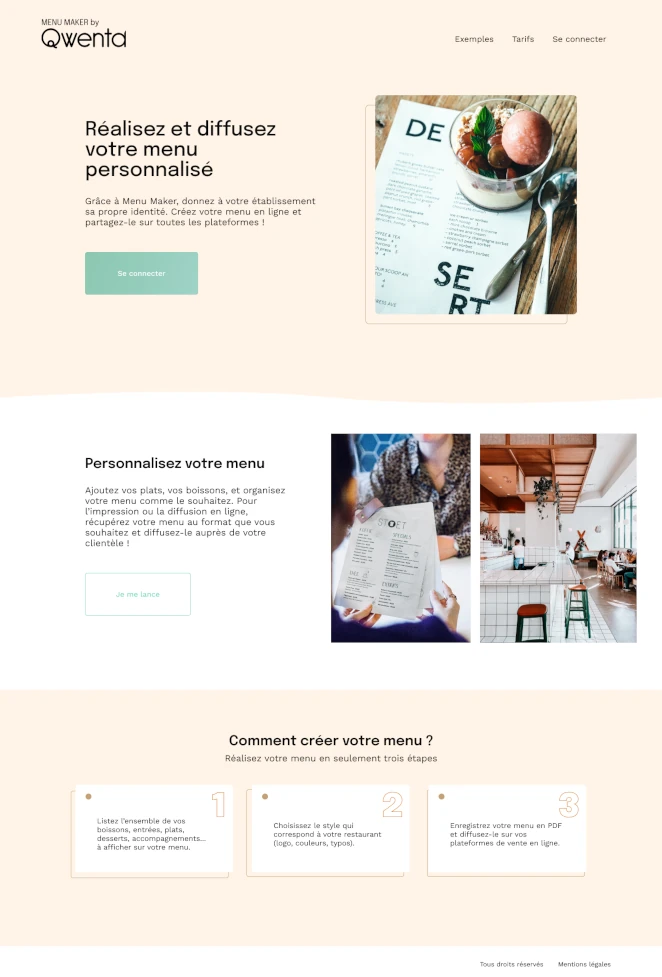
Qwenta's Menu Maker had user stories, a desktop mockup, and functional specs. What it didn't have was sequencing, arbitrated trade-offs, or a plan that survived contact with a non-technical sponsor. Enough material to feel ready. Not enough to actually be ready.
The premise
Most projects that fail don't fail in development. They fail in the week before development, when ambiguity gets locked in as scope and unresolved decisions get deferred to 'we'll figure it out.' This engagement was about refusing to defer.
The deliverable
A discovery memo covering architecture, data, export, accessibility, risk register, sequenced backlog, and sponsor-facing presentations. The dev team that reads this knows exactly what to build and why. The founder who reads it knows exactly what they're signing off on.
Brief disclosure, consistent with other reference builds in this collection: Menu Maker by Qwenta is a recognizable training brief. We're publishing it because scoping quality is the hardest engineering discipline to demonstrate from a portfolio, and a public brief is the cleanest way to show it without hiding behind vague client confidentiality.
The decisions on the table
Every scoping engagement starts with a list of open questions that someone has to close before development can be responsible. Listing them explicitly is the first act of product leadership. Here's the list we inherited, and the way each one got arbitrated.
1. PDF export: browser, Puppeteer, or managed service?
The question. Restaurateurs needed to export menus as print-ready PDFs. Three credible paths: client-side browser rendering, server-side Puppeteer, or a managed third-party service.
Our arbitration. Server-side Puppeteer as the MVP default. Browser-side rendering loses font control, page break consistency, and print bleed handling, all non-negotiable for a print-ready deliverable. A managed service would have added per-document cost and a third-party dependency on a core product flow. Puppeteer is operationally heavier than either alternative, but the trade-off moved in the correct direction for a product where print fidelity is the value proposition.
What we documented alongside the decision. The failure modes (Chromium memory pressure under load), the scaling threshold at which a managed service starts making sense, and the specific metric to watch (P95 PDF generation time) that would trigger a re-evaluation.
2. Data model: relational or document?
The question. Menu structure is hierarchical (restaurants, menus, sections, items, variants), which superficially suggests a document database. The data is also deeply queryable and relational at the business level (analytics, multi-restaurant chains, version history).
Our arbitration. PostgreSQL with a normalized relational schema plus JSONB columns for free-form presentation metadata. The "document model because the data is hierarchical" reflex is one of the most expensive mistakes in early-stage product engineering. It optimizes for the first milestone and makes everything after it painful.
Why this matters. Version history, multi-tenant analytics, and billing reconciliation are all downstream features that would be trivially supported on relational schema and actively sabotaged by a document store. Choosing the right foundation here was worth more than every visible feature in the MVP combined.
3. State management: Redux Toolkit, Zustand, or nothing?
The question. A rich menu editor needs local state, form state, server state, and undo/redo history. Three common paths plus the "do we even need a library?" option.
Our arbitration. React Hook Form + Zod for form state, TanStack Query for server state, Zustand for local UI state and undo/redo. No Redux. The team's instinct was to reach for Redux because the project "felt big," but Redux's cognitive overhead on a greenfield project with a small team is a resume-driven choice, not a product-driven one.
The honest caveat. If the team already knew Redux cold and had zero Zustand experience, this recommendation flips. The right state management library is the one the team can debug at 2am, not the one that looks best on an architecture diagram.
4. Accessibility: retrofit or native?
The question. Accessibility was mentioned in the brief but not specified. The default trajectory on projects like this is "we'll add ARIA later."
Our arbitration. Accessibility is a scope dimension, not a checklist. We sequenced it as a non-negotiable part of every sprint instead of a Phase 2 retrofit. The cost of doing it as you go is ~10% effort per feature. The cost of retrofitting is ~100% effort on the feature plus regressions elsewhere. There is no version of the math where retrofit is the right call.
What made this a scoping decision rather than a code decision. If accessibility isn't in the definition of done for every ticket in the backlog, it won't happen. The scoping phase is the only place where that constraint can be inserted without political cost.
What we explicitly recommended NOT doing
Scoping engagements are as much about what gets cut as what gets included. The recommendations that required the most political courage weren't the additions. They were the subtractions. Here's what we explicitly took off the table before development started.
- Multi-language support in the MVP. The brief didn't strictly require it, but the founder's instinct was to include it because "we'll eventually need it anyway." Including it would have doubled the data model complexity, tripled the testing surface, and added a localization pipeline that the product wasn't ready to support. Our recommendation: ship English-only, design the schema so i18n fits in later without refactoring, revisit after product-market fit.
- Real-time collaboration. Figma-style live editing felt cool in the concept deck and would have been a six-month engineering project on its own. For a menu editor used by one or two people per restaurant, the right answer is last-write-wins with a visible lock indicator. Anything else is gold-plating a problem that doesn't exist yet.
- A bespoke rich-text editor. The first instinct was to build a custom WYSIWYG for menu item descriptions. We recommended TipTap with strict schema constraints instead. Custom rich-text editors are tar pits: the team that builds one stops building the actual product for three months.
- Premature API versioning. A version 1 API was being designed with
/v1/in the URL and a full versioning strategy. For a product with zero external consumers, this is architecture astronauting. Our recommendation: no versioning until an actual breaking change is shipped to an actual external client. Add versioning the week it becomes necessary, not the week it might. - A custom design system. The ambition was to build a Qwenta design system alongside the product. We recommended using Radix UI primitives with Tailwind tokens, and revisiting the design system question at 10,000 MAU. A 2-person product team does not have the bandwidth to ship both a product and a design system. One of them will be mediocre and it will be the product.
The discipline of a scoping engagement is in the items the founder wanted and the scoping consultant agreed to cut anyway. Anyone can add features to a backlog. Taking them off is where senior PM judgment lives.
Recommended stack
Stack recommendations were scoped to the use case, the team's existing knowledge, and the budget constraint, not to our personal preferences.
- React + TypeScript (editor UI)
- Zustand (local UI state, undo/redo)
- React Hook Form + Zod (form state and validation)
- TanStack Query (server state, caching, optimistic updates)
- Radix UI + Tailwind (headless primitives, no bespoke design system)
- TipTap (rich-text editor, schema-constrained)
- Node.js + Fastify (API layer, faster than Express for this workload)
- PostgreSQL with JSONB (relational model, document flexibility where needed)
- S3-compatible storage (menu images, export caching)
- Puppeteer on a dedicated worker pool (PDF export)
Each choice was documented with its rationale, its alternatives, and the specific conditions under which we'd revisit it.
The non-technical translation layer
A scoping document that only a CTO can read is a scoping document that doesn't get signed off. The hardest deliverable of this engagement wasn't the technical memo. It was making the technical memo actionable for a founder who had to approve it without reading React code.
The sponsor presentation was structured around three questions the founder actually cared about:
- "What are we building in the first ninety days?" Sequenced feature map with a visible MVP boundary and a clearly-labeled "everything past this line is not happening yet."
- "Where is the money going?" Cost/complexity/impact breakdown per major decision, with the dollar-adjacent consequences translated into plain English. Puppeteer isn't "Chromium rendering pipeline"; it's "an extra $200/month in server costs in exchange for the right to print menus that don't look like a web page."
- "What could still go wrong?" A risk register written in natural language, not in engineering jargon. "PDF export might not scale past 500 concurrent users" is not a risk. "If a big customer signs up and tries to generate menus for 200 locations at once, we'll have a two-week fire drill" is a risk.
Every slide ended on a single decision the founder had to make. No slide was there to inform; every slide was there to unblock. The meeting produced eleven signed-off decisions in ninety minutes. That's the only metric that matters for a scoping presentation.
What we'd add for a paying client
The honesty section we run on every case study. For a real client with a real budget and a real compliance perimeter, here's what would extend this scoping work.
- Customer interviews with five to ten real restaurateurs. The user stories in the brief were product-owner projections, not validated user needs. A real engagement starts with "we don't actually know if we're building the right thing" and resolves it empirically.
- A written risk register with owned mitigations. The risks we surfaced were documented, but on a real engagement, each risk would have an owner, a trigger condition, and a pre-agreed response plan. Unowned risks are just anxiety.
- A vendor trade-off document. Puppeteer vs. managed PDF service, S3 vs. R2, PostgreSQL vs. Neon: every infrastructure choice has an adjacent "buy instead" option that the scoping phase is the only time to seriously evaluate.
- A legal and compliance pass. A menu editor that handles restaurant data and potentially customer data (online ordering, allergen disclosures) has compliance implications the scoping document should surface, not defer to "we'll figure that out with a lawyer later."
- Explicit success metrics with their instrumentation. Not "we want to be fast" but "P75 menu-to-PDF under 4 seconds, measured via OpenTelemetry, alerting at 6 seconds." The scoping document should specify how success will be measured before the first feature ships.
None of this was in scope here. All of it is where a real engagement extends.
What this engagement reveals
Most agencies sell "discovery" as a week-long workshop that produces a nice PDF and no actual decisions. The discovery that saves budget is the one that arbitrates the questions nobody wanted to close, cuts the features nobody wanted to cut, and puts it all in a format the person writing the cheque can actually understand. That discipline has more in common with writing a Supreme Court brief than with writing a product spec, and it's the rarest skill in the studio industry. We care about it more than our billing rate suggests we should, and it's the reason some of our best engagements start months before the first line of code.
If you're a founder staring at a project that feels ready but isn't, a PM who knows the brief has unresolved decisions baked into it, or a sponsor about to sign a development contract you can't fully evaluate, this is the engagement we're built for. The first call is a 30-minute working session where we look at your current material and tell you honestly whether it's ready to build