
This is a reference build — a public brief we used to demonstrate a specific engineering discipline. See Client engagements for paid project work.
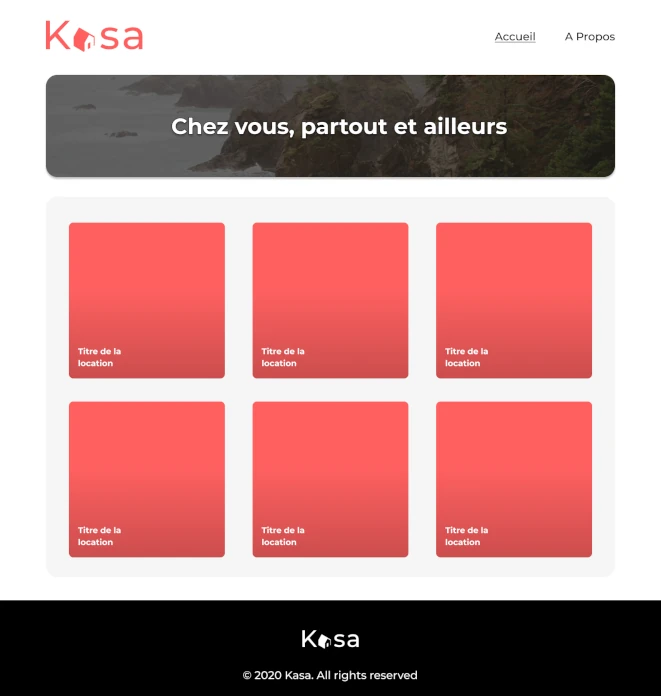
Overview
The brief was the kind that looks deceptively simple: Figma mockups, a JSON file, no backend, no API, no auth. Build it in React. Make it work. The reason briefs like this separate junior developers from senior engineers isn't the features. It's the architectural decisions you make when nobody is forcing you to make them. This is the build log of those decisions.
The build
A complete React SPA for a peer-to-peer rental platform: dynamic routing, modular component system, edge-case-aware navigation, Sass module styling, and a data layer designed to be swapped for a real API without touching the rest of the app.
The brief
Figma mockups, interaction prototypes, and a static JSON file. No backend. No design system. No external dependencies allowed beyond React Router. Build something that holds up under production-grade scrutiny.
The constraint that defined the project
Build the data layer as if a real API were coming next month, even though it isn't. The local JSON had to be a temporary implementation detail, not an architectural assumption baked into every component.
The outcome
A SPA that matches the Figma down to the pixel, handles every edge case the brief didn't specify, and could absorb a backend swap by replacing a single module. Live URL above, auditable in any DevTools session.
The interesting question on a build like this isn't "does it work." It's "would another engineer want to inherit this codebase?" That's the question we optimized for, and it's the one that decides whether a front-end becomes a product or a technical debt invoice.
Why we're publishing this anyway
An honest disclosure before the technical part: Kasa is a well-known training brief. Any senior engineer reading this will recognize it within the first paragraph. We're publishing it as a case study anyway, and here's why that decision is the case study.
A familiar brief is the cleanest possible benchmark. When the requirements are public, the differentiator stops being "what did you build" and becomes "how did you build it, and what did you decide that nobody asked you to decide." That's a more honest test of senior engineering than any bespoke project, because there's no vague client to hide behind.
What you're about to read is the architectural reasoning that turns a React tutorial into a production-shaped codebase: the four decisions that weren't in the brief, the trade-offs we ran, and the things we deliberately did not do. If the gap between our build and the average implementation of the same brief isn't visible to you in five minutes of reading, we haven't earned the engagement.
This is also a deliberate honesty signal. Studios that won't tell you what a project actually was will find a way not to tell you what your project actually is, either.
The four hard decisions
1. Building a data layer that lies about its source
The brief says "load this JSON file." The naive implementation is import data from './data.json' at the top of every component that needs it. It works. It also welds the entire application to a file path, makes future API migration a multi-day refactor, and makes testing nearly impossible without filesystem hacks.
We built a thin data access module that exposes async functions (getListings(), getListingById(id)) wrapped around the local JSON but typed and shaped exactly like the eventual REST endpoints would be. Components await these functions. They have no idea whether the data came from a file, a fetch call, or a future GraphQL resolver. The day a real API arrives, three lines change in one file.
This is the single most important decision in the build, and the one that most "completed the brief" implementations skip.
2. Treating route parameters as untrusted input
React Router gives you dynamic params for free. Most implementations grab them and immediately pass them to the data layer. That works until a user types /listing/foo into the URL bar, at which point the application either crashes, renders an empty page, or shows a misleading error.
We treat every route parameter as untrusted. The listing route has a guard that validates the ID against the data set before rendering, redirects to 404 on invalid input, and surfaces a graceful error state if something goes wrong mid-load. The 404 page is a real page with the same layout as the rest of the app, not a <div>404</div> placeholder. Edge cases get the same care as the happy path.
3. Resisting the urge to use a UI library
Material UI, Chakra, shadcn: any of them would have shipped this build faster. We deliberately wrote every component from scratch in Sass modules. Three reasons:
- The Figma was specific enough that fighting a library's defaults would have cost more time than building from zero.
- A UI library is a permanent dependency. Once you adopt one, removing it is a six-month project. For a portfolio-scale build, that lock-in is uneconomic.
- Building components from scratch forces you to actually think about composition, prop APIs, and reuse: exercises that disappear when you import a
<Card>and call it a day.
The Slideshow, Collapse, Cards, and Layout are bespoke, composable, and depend on nothing outside React itself.
4. Component APIs designed for the second use, not the first
The first time you build a Slideshow, the natural API is <Slideshow images={listing.images} />. It works for the listing page. Then you need a single-image listing and the component breaks. Then you need a Slideshow somewhere else with different navigation behavior and you fork the component.
We designed every reusable component for its second use case before its first. The Slideshow handles single-image listings as a first-class case (no arrows, no counter, no infinite loop logic activated). The Collapse takes children, not a string, so it can hold anything. The Layout is composition-based, not slot-based. None of this was in the brief. All of it is what the brief would have demanded six months later.
Key results
Pixel-faithful across breakpoints
Mobile, tablet, desktop: the build matches the Figma at every breakpoint, including the in-between sizes the mockups didn't specify.
Every edge case handled
Invalid IDs, malformed URLs, single-image listings, empty filter results: all handled gracefully, none of them crashing the app or showing a blank screen.
Swap-ready data layer
Replacing the local JSON with a real REST API is a one-file change. The component tree, the routing, and the rendering logic all stay exactly as they are.
Zero runtime dependencies beyond React Router
No UI library, no animation library, no state manager. The bundle is small, the surface area is auditable, and there's nothing to upgrade in six months.
Tech stack
- React (function components, hooks)
- React Router (with route guards on dynamic segments)
- Sass modules (component-scoped, no global leak)
- Local JSON wrapped in an async data access module
- ESLint, Prettier, Stylelint (enforced via pre-commit)
- Git / GitHub
- Vercel (deployment)
What this build would look like with a real API
The whole point of the data layer abstraction is that the migration path is trivial. Here's the concrete roadmap: the kind of thing a CTO can audit in five minutes and use to decide whether the architecture is real or decorative.
- Replace
getListings()andgetListingById()withfetchcalls. Same signatures, same return shapes, same error semantics. Components don't change. - Add a loading state primitive. The current implementation resolves synchronously enough that loading states are barely visible. With network latency, we'd add a shared loader pattern, but the surface area is one custom hook, not a refactor.
- Introduce error boundaries at the route level. Currently, errors are caught at the component level because the data layer can't really fail. With a network in the picture, route-level boundaries make the error UX consistent.
- Add request deduplication and caching. SWR or TanStack Query slot in cleanly because the data layer is already async. They wrap the existing functions instead of replacing component logic.
None of this requires touching the component tree, the routing, or the styles. That's not an accident. That's what the constraint in section 1 was for.
What this engagement reveals
Most front-end engagements are billed by the screen and judged by how closely the result matches the mockup. Both metrics are wrong. The right metric is whether the codebase a year from now is a product or a liability, and that question is answered by decisions made in the first week, not the last. We optimize for the codebase you'll inherit, not the screenshot you'll publish.
If you have a Figma file, an unclear backend timeline, and a front-end that needs to be built once and survive what comes next, this is the engagement we're built for. The first call is a 30-minute working session where we look at your design, your data shape, and your expected timeline, and tell you honestly whether the architecture you need exists yet or has to be invented. If your situation is simpler than that and a templated build would serve you better, we'll say so in the call. Straight answers only.
See if this is the right level of engineering for your build.