
This is a reference build — a public brief we used to demonstrate a specific engineering discipline. See Client engagements for paid project work.
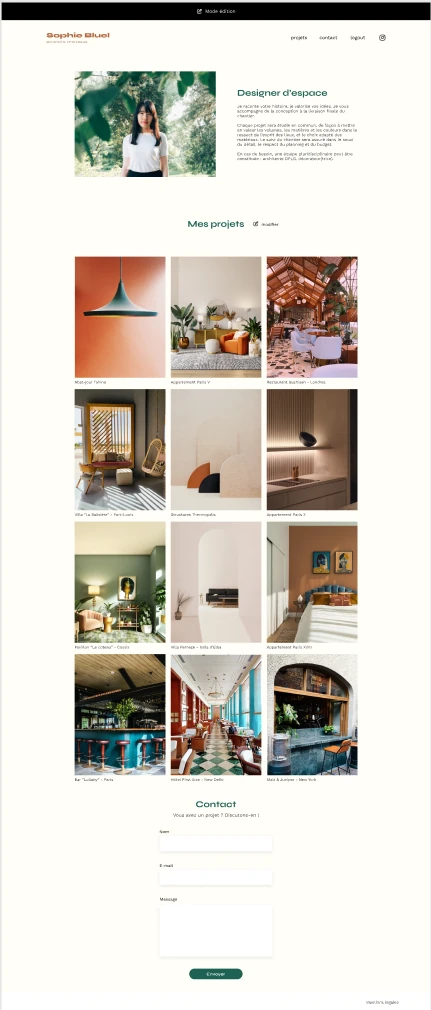
Overview
Most freelance creatives are paying a developer every time they finish a new project. The site that's supposed to win them work has become a cost center that punishes them for being productive. This build was about flipping that dynamic completely: turning a portfolio that drained the client's time into one that worked for her while she was sleeping.
The build
Convert a static interior designer's portfolio into a fully self-managed web application: API-driven gallery, authenticated admin mode, in-place editing, and zero page reloads, all in vanilla JavaScript with no framework dependency.
The client
Sophie Bluel, interior designer running her own practice. The kind of professional who finishes a project on Friday and wants it on her site by Monday, without filing a ticket with anyone.
The shift that mattered
From 'I have to ask my developer' to 'I log in and it's done.' This is the only metric that mattered. Everything else in the build was in service of that single user experience.
The outcome
A portfolio that updates itself, an admin interface that doesn't feel bolted on, and a codebase small enough that the next engineer can read it cover to cover in an hour. Live URL above.
Most front-end builds optimize for what looks good in a screenshot. This one optimized for what happens at 11pm on a Sunday when the client wants to add a project before Monday morning. Those are different briefs, and they produce very different codebases.
An honest note about this brief
Same disclosure we made on the Kasa case study, for the same reason: Sophie Bluel is a recognizable training brief, and any senior front-end engineer will spot it within the first paragraph. We're publishing it as a case study anyway, and the reasoning is part of the case.
Public briefs are the cleanest possible benchmark. When the requirements are known and the back-end is provided, the question stops being "what did you build" and becomes "how did you reason about it, and what did you do that wasn't asked for." That's a more honest test than any private engagement, because there's no vague client to hide behind and no proprietary scope to wave around.
The interesting gap on a build like this isn't between people who completed it and people who didn't. It's between people who treated it as an exercise and people who treated it as a real product with a real user. Everything that follows is the second version of that.
What changed for Sophie
The technical work matters, but not for its own sake. Here's the user-level shift the build produced: the only thing that actually shows up in the client's life.
- Adding a project went from a 48-hour developer round-trip to a 3-minute self-service action. Upload the photo, type the title, pick the category, hit save. Done.
- Removing outdated work stopped requiring permission. Old projects she'd outgrown were quietly retired, immediately, without negotiating with anyone or scheduling a "small change" that takes a week.
- The site stopped being something she avoided. Static sites become emotionally dead the moment the client realizes touching them is expensive. A self-managed site reverses that: it becomes a place she actively wants to maintain because the friction is gone.
- The relationship with her web presence flipped. From "the thing my developer built that I can't touch" to "the thing I run." Same site, completely different psychological ownership.
This is the entire point of building admin tools that don't feel like admin tools. The work succeeds when the client stops thinking about the site as a technical artifact and starts thinking about it as part of her workflow.
The four layers that had to coexist
The technical interest of this build isn't in any individual piece. It's in how four independent layers had to be stitched together cleanly without a framework doing it for you.
The data layer. Async fetch calls with explicit error handling, response validation before render, and a clear separation between "we got data" and "we got data and parsed it correctly." No optimistic assumptions about network success. Every failure mode produces a recoverable state, not a blank screen.
The session layer. JWT stored explicitly, lifecycle managed by hand (login, store, check on protected routes, clear on logout), no third-party auth library hiding the mechanics. The token is checked once on page load and the UI either reveals or hides admin affordances accordingly. No flicker, no flash of unauthenticated content.
The interaction layer. Filtering happens in memory after the initial fetch: no extra API calls, no page reloads, no debounce hacks. The filter state lives in a single source of truth, the gallery re-renders by diffing against that source, and event delegation handles all the click targets at the gallery level instead of binding listeners to every card.
The editing layer. A modal that handles FormData multipart uploads, validates client-side before hitting the network, gives optimistic feedback on success, and rolls back gracefully on failure. The DOM updates happen in place: when Sophie deletes a project, the card disappears immediately, not after a refresh.
Stitching these four layers together without leaning on React or Vue is the actual engineering. Anyone can build any one of them. The discipline is keeping them from leaking into each other when there's no framework forcing the boundaries.
Tech stack
- HTML5 (semantic, accessible)
- CSS3 (no preprocessor, no framework, no utility library)
- JavaScript ES6+ (vanilla, modular, no build step)
- Native
fetchfor API consumption - JWT-based session management (manual lifecycle)
FormDataAPI for multipart uploads- Provided Node.js back-end (documented via Swagger)
- Git / GitHub
- Vercel (deployment)
What we'd build differently for a real client today
The honesty move on every case study in this collection: a section on what the next version would look like if the constraints relaxed. For a paying client with a real budget, here's what would change.
- Image optimization at upload time. Sophie's phone photos go to the API at full resolution. For a real engagement, we'd add client-side resizing and compression before upload, and serve responsive images via
srcsetfrom the back-end. Significant load time gain on mobile, where most prospects discover an interior designer. - Optimistic UI on every mutation. The current build waits for the API to confirm a delete before removing the card from the DOM. For a real client, we'd flip that: remove immediately, confirm in the background, roll back visibly only if the network fails. The perceived speed difference is dramatic.
- A staging environment for content. Right now, every change Sophie makes is live instantly. For most professionals that's fine; for some it's terrifying. A "draft" mode with a one-click publish would eliminate that anxiety entirely.
- Image alt text written at upload, not as an afterthought. Required field on the upload form. Better accessibility, better SEO on image search, and the friction of "you have to describe this image" is exactly what a portfolio site should be encouraging anyway.
- A real CMS migration path. Sophie's admin interface is built specifically for her. For a client we expected to grow into a small studio with multiple users, we'd plan the migration to a headless CMS from day one. Not because the current solution is bad, but because the right architecture for one user is not the right architecture for five.
None of this is criticism of the build as it stands. It's the gap between an exercise scoped to a fixed brief and a product engagement where the constraints are negotiable. Knowing the difference is part of the job.
What this engagement reveals
Most front-end builds get sold on the framework, the design system, the number of components, the bundle size. None of those things are what the client experiences. What the client experiences is whether updating their own site feels easy or feels expensive, and that experience is determined by a hundred small decisions that have nothing to do with the stack. We optimize for the experience the client lives with, not the architecture diagram we could draw on a wall.
If you're a freelance professional, a small studio, or a solo founder whose own website has become a thing you avoid touching, the question isn't whether you need a redesign. It's whether you need a different relationship with your site entirely. The first call is a 30-minute working session where we look at how you actually use your site today, what you wish you could do without asking anyone, and whether that gap is closeable in the budget you have. If the answer is "you don't need us, you need a $10 website builder," we'll say so in the call. Straight answers only.